New Media Unlocked!
You can now publish on USA TODAY through MarketersMEDIA. That's 142M+ monthly visitors and DR 92 backlinks for every release you publish.
Better reach, better SEO, better credibility.

You can now publish on USA TODAY through MarketersMEDIA. That's 142M+ monthly visitors and DR 92 backlinks for every release you publish.
Better reach, better SEO, better credibility.
Table of Content


You have an event coming up. You know it is worth covering. You send out a media alert, but no journalists show up. No cameras.
The event goes ahead, and the coverage you planned around never materialises.
Most of the time, the event was not the problem. Instead, the alert was.
A weak media alert buries the news, skips the logistics, or gives a reporter no clear reason to put it on their calendar.
But, if your organisation manage to have an effective media alerts, it does the opposite: it tells the journalist exactly what is happening, who will be there, and why their audience would care, all on a single page.
A media alert, also called a media advisory, is a short notice sent to journalists to invite them to cover an upcoming event.
It is not a story. It is a logistical invitation.
Where a press release tells the whole story (quotes, background, supporting data), a media alert gives reporters just enough to decide whether attending is worth their time.
| Feature | Media Alert | Press Release |
|---|---|---|
| Purpose | Invite journalists to attend an event | Share a complete news story |
| Length | One page or less | 400–600 words |
| Format | Who / What / When / Where / Why structure | Headline, dateline, body, boilerplate |
| Contains quotes? | Rarely | Almost always |
| When to send | 3–7 days before the event | On or before the announcement date |
| Goal | Drive in-person or virtual attendance | Generate coverage from journalists who weren’t there |
The simplest rule: if you need journalists to show up, send a media alert. If you need them to write about something without showing up, send a press release.
Media alerts work best when the event itself is the news. When a journalist being there in person adds something that a written statement alone cannot deliver.
That includes:
If the event does not require physical presence to be covered, a press release is the better tool.
Want your brand story featured on credible media outlets?
MarketersMEDIA Newswire helps you get the kind of third-party visibility these big brands achieved—through press release distribution to established publications. Get in touch with us today.
A press conference usually means something significant is being announced.
That is exactly why the media alert has to be written carefully.
The goal is to make the news obvious without dressing it up.
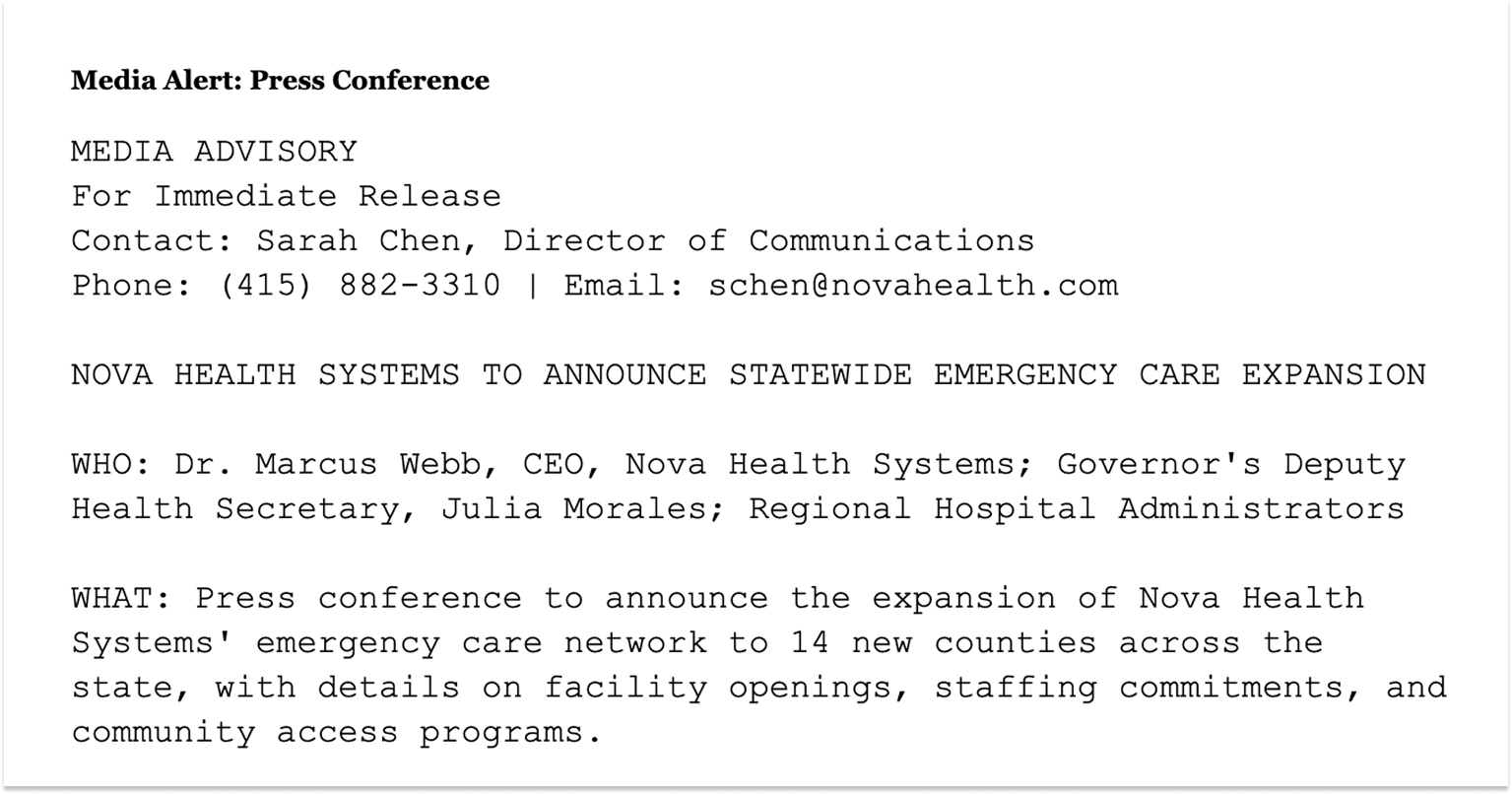
State what is being announced, who is speaking, and why it matters to the people the reporter covers. For instance:
Download the full example here.
The WHY line inside the media alert will do the heavy lifting. It gives a concrete statistic that immediately conveys the story’s scale and newsworthiness.
By mentioning WHO section names real titles alongside a notable external figure, it sends a signal that this is not an internal company event.
The logistics are specific and practical, which shows the organiser respects the reporter’s time and has actually thought the event through.
Product launches are among the most common reasons companies send media alerts, and among the most commonly done wrong.
When you are excited about your own product, the instinct is to load the alert with features, specs, and benefits.
The problem is that reporters are not your customers. They are not evaluating whether to buy it.
They are evaluating whether their audience would find it interesting enough to read about. That is a completely different question, and it needs a different answer.
What gets a journalist to a product launch is not a feature list. It is knowing that showing up gives them something they cannot get from a press release: a hands-on experience, a live demonstration, access to the team, something visual and tangible. Lead with that.
For example:
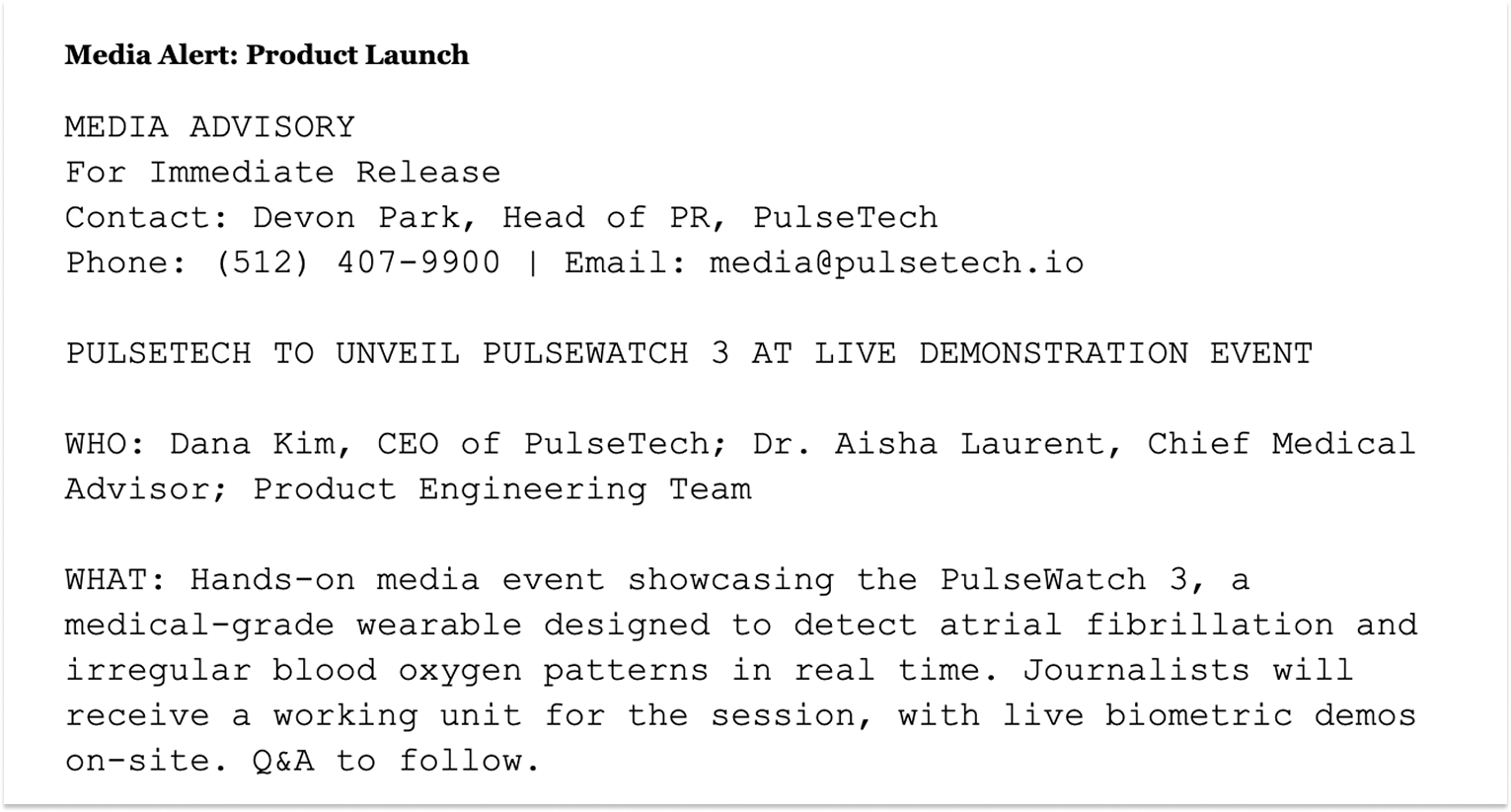
Download the full example here.
The temptation is to cram in features and benefits. But, please resist it.
Reporters are not buyers. They want to know what they will be able to show their audience and why it matters to people who are not already invested in the company.
Instead, you can include WHAT will journalists actually be able to do there? “Journalists will receive a working unit for the session” is a concrete reason to show up that a press release cannot replicate.
You can also include an explanation on WHY is the product important for the audience.
Grand openings are one of the easier events to get coverage for, but also one of the easiest to write a forgettable alert about.
Every week, somewhere in every city, a business is opening its doors for the first time.
If your alert reads like every other grand opening announcement, there’s a high possibility that it will be ignored.
The question a reporter asks before they decide to go to your event is simple: why this one, why now, and what will I actually see when I get there?
For instance, a ribbon-cutting ceremony on its own is not a story.
But, a ribbon-cutting ceremony that kicks off the city’s first zero-waste grocery store, tied to a mayor’s sustainability initiative, with a local councillor attending, is a story.
The difference is entirely in how the alert is written, not in the event itself.
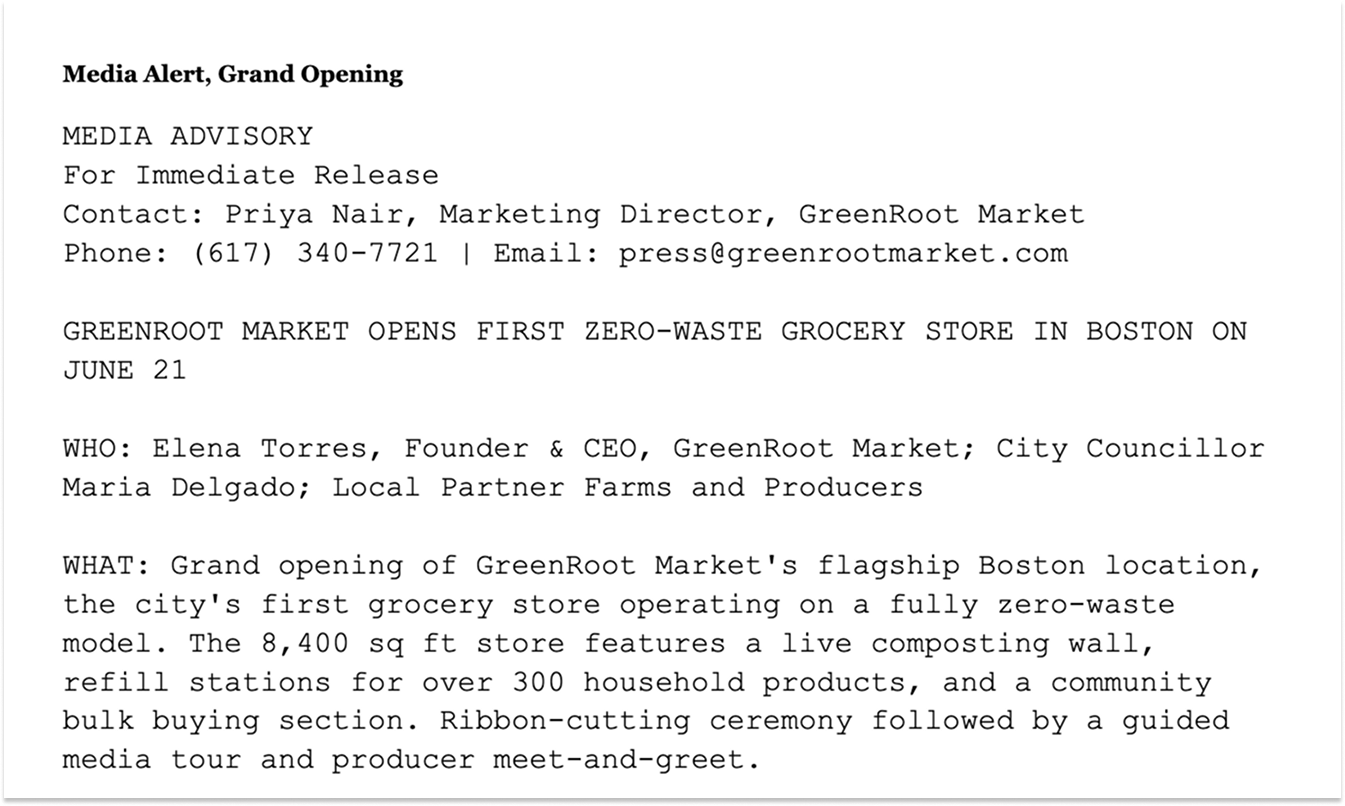
Download the full example here.
Community and charity events are genuinely difficult to pitch.
The cause matters to the organisation, and often to the community, but that alone does not make it newsworthy to a journalist.
Reporters receive media alerts for fundraisers, galas, and awareness events constantly.
Most read identically: the organisation is hosting an event, the cause is important, please come.
What breaks through is specificity.
A real person with a compelling story. A number that puts the problem in scale.
Something happening at the event that a journalist cannot witness any other day of the year.
The cause gives the event meaning, but it is the concrete detail that gives a reporter something to write about.
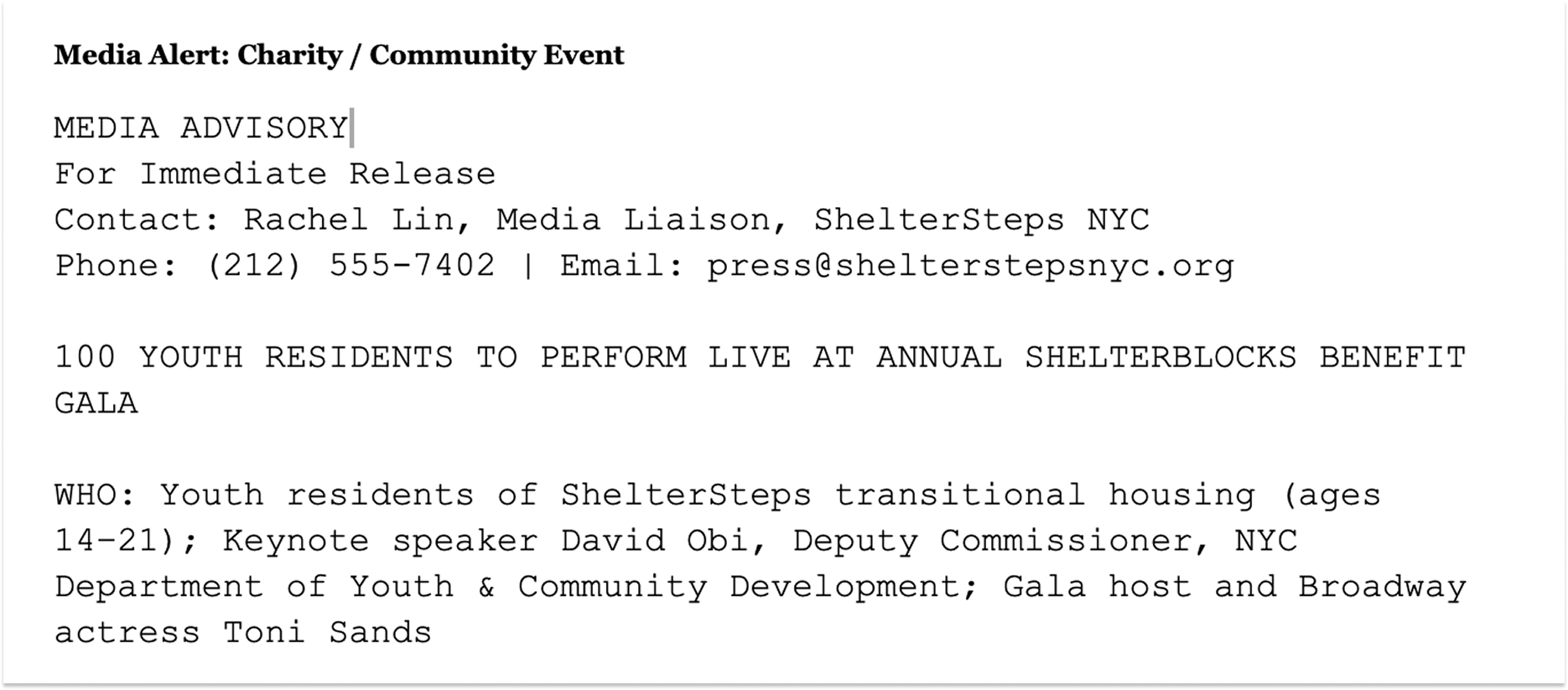
Download the full example here.
Executive appearances and award ceremonies are probably the hardest event type to get media coverage for.
From a journalist’s perspective, a company celebrating its own executive is not inherently a story.
It is internal news dressed up as public news, and most reporters can see through it immediately.
That does not mean these events cannot generate coverage.
It means the alert has to work harder to reframe the event around something bigger than the award itself.
What is the executive actually saying? What issue are they addressing? Is there a policy question, an industry debate, or a public concern that their appearance connects to?
If the answer is yes, lead with that. The award is context, not the story.
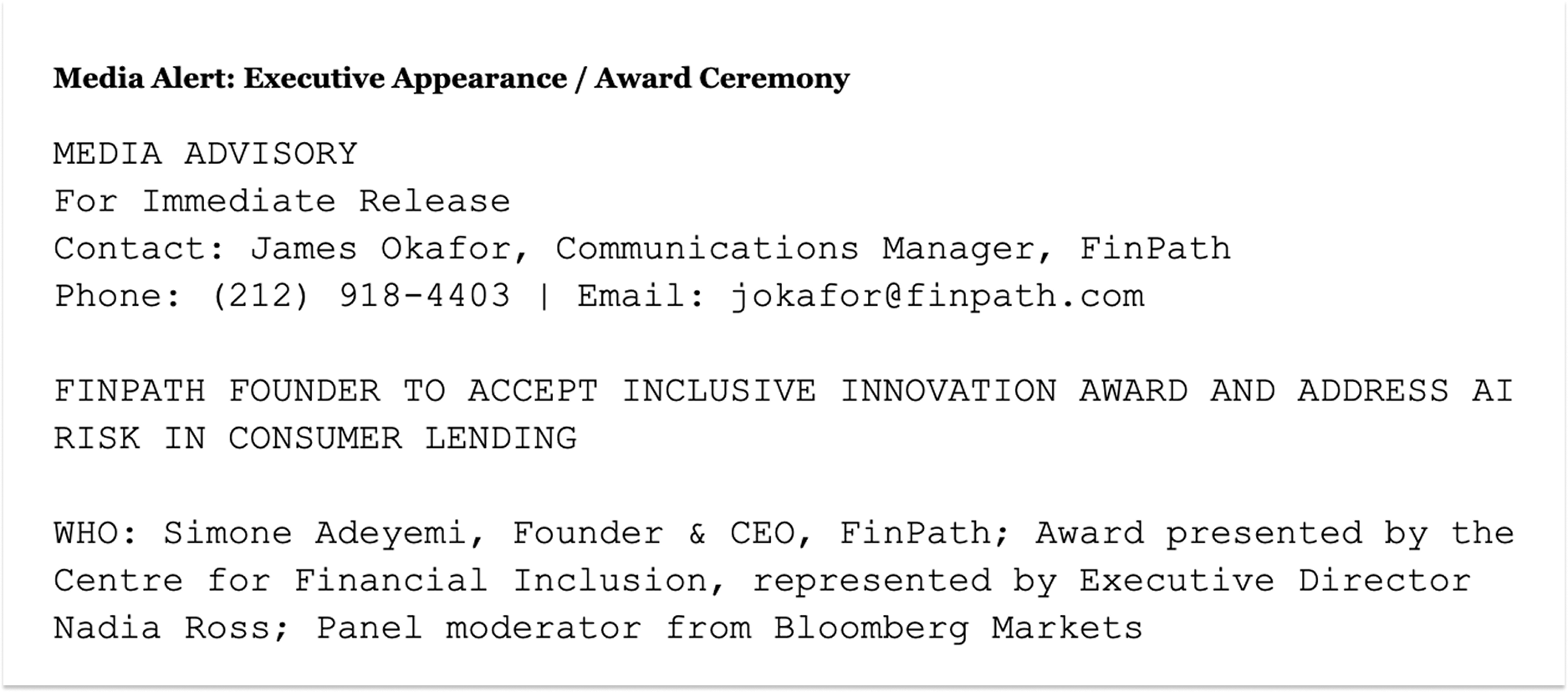
Download the full example here.
Look across all five examples above and the same structure appears every time.
Start with a headline that signals the story, not just the event name. “Annual Gala” tells a reporter nothing.
“100 Youth Residents to Perform Live at Annual ShelterBlocks Gala” tells them what they will see, who is involved, and what kind of story it could become.
The headline is the first filter, and most alerts fail here.
The WHO section carries more weight than most people realise. A list of internal staff names does not move the needle.
What moves the needle is a credible external figure, a recognisable executive, or a notable speaker that gives the journalist an angle beyond the company itself.
Titles and organisations matter because they tell editors whether this is worth assigning a crew to.
For WHAT, the instinct is to describe the announcement. That is wrong. Describe what a journalist will be able to do when they are there.
Will they see a live demonstration? Can they speak to the CEO one on one? Will there be photo opportunities? A reporter is asking whether attending in person adds anything a press release cannot give them. Answer that question directly.
WHEN and WHERE need to be precise with no room for confusion.
Include the date, start time, timezone, full address, and building or floor number if relevant.
For virtual events, include the platform and access link. A journalist who has to email back to ask for the location will usually not bother.
The WHY line is where most media alerts are weakest.
It is not enough to say the event is important. Connect it to something reporters are already tracking: a city initiative, an industry trend, a public health issue, a regulatory development.
One or two sentences with a real statistic or policy context can be the difference between coverage and silence.
Finally, include a named contact with a direct phone number and email, and an RSVP deadline with a specific date. A general press inbox signals that nobody is personally accountable for the response. A deadline creates urgency without pressure and helps you plan logistics accurately.

Use press releases to get your brand mentioned and recommended by ChatGPT, Gemini, and Perplexity when people search.
 PR playbook to get your brand cited in AI answersHow to check and fix what AI says about your brand2 minutes checklist to make your PR AI-friendly
Where would you like to receive the AI PR toolkit:
Writing a strong media alert is half the work. Getting it in front of the right journalists at the right time is the other half.
On timing, the general rule is to send your alert three to five business days before the event.
For larger events such as a major press conference or significant award ceremony, send it a full week in advance to allow assignment desks time to schedule coverage.
A follow-up reminder sent one to two days before the event is standard practice and increases attendance rates.
On distribution, the three-channel approach works consistently:
One practical note: never embed the alert in an attachment. Most journalists will not open it. Copy and paste the full text into the email body, with the most important line, your headline, in the subject field.
The five examples above give you a working structure for every major event type.
Adapt them to your specific event, keep the WHY line connected to a real story, and make the logistics impossible to misread.
Once the alert is ready, pay attention to when you hit send.
Journalists get a flood of emails daily, and knowing when is the best day to send email makes a real difference in whether yours gets opened before the event or buried under everything else.
A: A media alert is a structured logistics document inviting journalists to attend an event. A media pitch is a personalised story suggestion sent directly to a specific journalist, proposing an angle or idea they might want to pursue. Media alerts are sent to a broad list; pitches are targeted and conversational. You might send a pitch before an event to build interest, then follow up with a media alert closer to the date.
A: Yes. For virtual events, the WHERE section should include the platform or streaming link details and any access credentials. The format and structure remain identical to an in-person alert. Virtual events can benefit from noting whether recordings will be made available and whether journalists can ask questions in real time, since those details affect coverage decisions.
A: One page maximum. The WHO / WHAT / WHEN / WHERE / WHY structure should never exceed a single printed page or roughly 250–350 words. Anything longer shifts from invitation into press release territory, and journalists will read it accordingly, or not at all. If your event has additional background information that context requires, attach a one-page fact sheet separately.
A: Not a media alert. Send a press release instead. Once the event has taken place, the format shifts. A post-event press release covers what was announced, includes quotes from speakers, and provides the full story for journalists who did not attend. Some organisations pair this with a media recap or photo release sent within 24 hours of the event to capture coverage from outlets whose reporters were not able to be there in person.
A: Indirectly, yes. When media alerts are distributed through newswire services and published on established news domains, the resulting URLs are indexable by search engines and readable by AI systems that build knowledge from public news archives. Over time, a consistent stream of distributed media content on credible domains contributes to how search engines and AI tools understand and reference a brand, particularly for companies building long-term visibility strategies alongside their PR outreach.


 PR playbook to get your brand cited in AI answer
How to check and fix what AI says about your brand
2 minutes checklist to make your PR AI-friendly
PR playbook to get your brand cited in AI answer
How to check and fix what AI says about your brand
2 minutes checklist to make your PR AI-friendly